Jump to: 3A Project box · 3B Spur gear · 3C Sketch-to-CAD · Downloads · Video storyboard
Three new skills in about 15 minutes:
fillet → shell → floor hole. Hollow parts with one open face.spur_gear + hub cylinder + union + a bore and a bolt circle of holes.You need a signed-in account with alpha access on /design/. If you haven't done Tutorials 1 and 2, start with the Quick Start. Every recipe below was built and checked with design/dsl.py, and every volume is the real result.
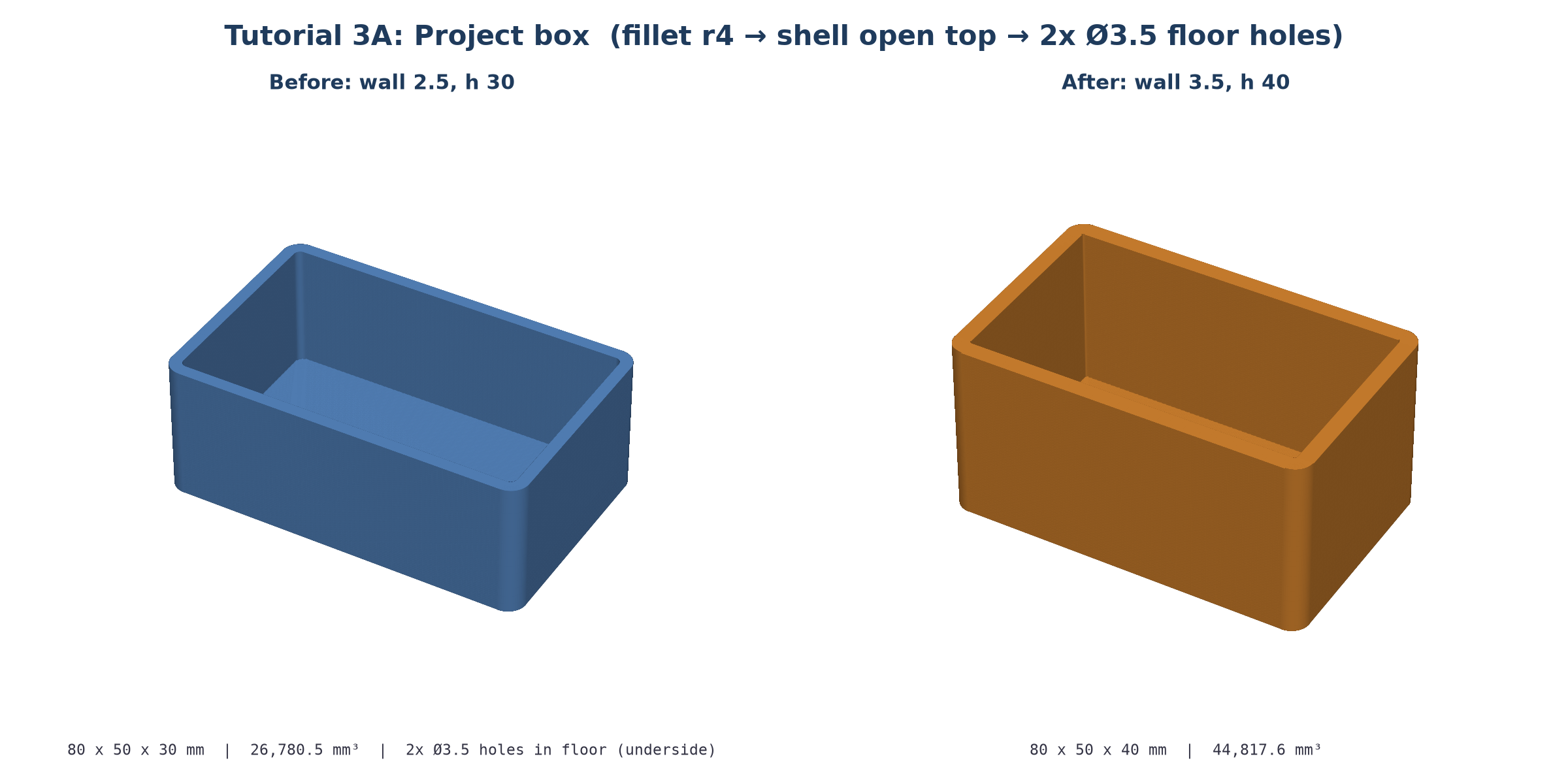
Rectangular electronics enclosure box 80x50x30 mm, 2.5 mm wall thickness, open on top, with 4 mm outer vertical corner fillets and two 3.5 mm mounting holes on the bottom floor
Set Mode = 3D print and click Generate. Expect PASS with a bounding box of 80 × 50 × 30 mm and a volume of 26,780.5 mm³.
// prompt: Rectangular electronics enclosure box 80x50x30 mm, 2.5 mm wall thickness, open on top, with 4 mm outer vertical corner fillets and two 3.5 mm mounting holes on the bottom floor
// verified with design/dsl.py 2026-10-27, volume 26780.5 mm^3
{
  "plan": "1. Solid block 80x50x30, centred in x/y, z 0..30. 2. Round the 4 vertical outer corners (r 4). 3. Shell inward 2.5 mm with the top face removed. 4. Two 3.5 mm mounting holes through the 2.5 mm floor, 25 mm either side of centre.",
  "units": "mm",
  "issues": [
    {"type": "assumption", "msg": "Mounting holes placed on the long axis at x = \u00b125 mm, y = 0.", "ref": "$hole_dx"}
  ],
  "params": {
    "w": 80,
    "d": 50,
    "h": 30,
    "wall": 2.5,
    "corner_r": 4,
    "hole_d": 3.5,
    "hole_dx": 25
  },
  "steps": [
    {"id": "block", "op": "box", "size": ["$w", "$d", "$h"]},
    {"id": "rounded", "op": "fillet", "target": "block", "radius": "$corner_r", "edges": "vertical"},
    {"id": "hollow", "op": "shell", "target": "rounded", "thickness": "$wall", "open_face": "top"},
    {
      "id": "mounts",
      "op": "hole",
      "target": "hollow",
      "face": "bottom",
      "positions": [["=-$hole_dx", 0], ["$hole_dx", 0]],
      "diameter": "$hole_d",
      "depth": "$wall"
    }
  ],
  "result": "mounts"
}
Why the steps are in this order
- Fillet before shell. Rounding the 4 vertical edges of the solid block first means shell offsets the rounded walls inward. You get r4 corners outside and matching r1.5 corners inside (4 − 2.5) for free. Shelling first and filleting second would need two fillets and often fails in the kernel.
- shell with open_face: "top" removes the +Z face and hollows everything else inward by $wall. The floor and the walls both end up exactly wall thick.
- hole on face: "bottom" with depth: "$wall". Positions on the bottom face are global (x, y). box defaults to anchor: "base", so x and y are centred and [±25, 0] sits on the long axis. Using depth: "$wall" means the holes cut only the floor, and they stay correct when you change the wall thickness.
In the CADL editor, change two params and press Ctrl+Enter or Rebuild (no LLM):
"h": 30 → 40, "wall": 2.5 → 3.5
| Version | Size | Volume |
|---|---|---|
Original (wall 2.5, h 30) |
80 × 50 × 30 | 26,780.5 mm³ |
Tweaked (wall 3.5, h 40) |
80 × 50 × 40 | 44,817.6 mm³ |
The floor holes follow automatically, because their depth is $wall. Other one-number edits to try: corner_r 4 → 8 for softer corners, hole_dx 25 → 30 to spread the holes.
Lid idea: ask Edit with AI to "add a separate 80x50x2.5 lid with a 1.5 mm lip that fits inside the walls". Or reuse the enclosure prompt from Tutorial 1's prompt list.
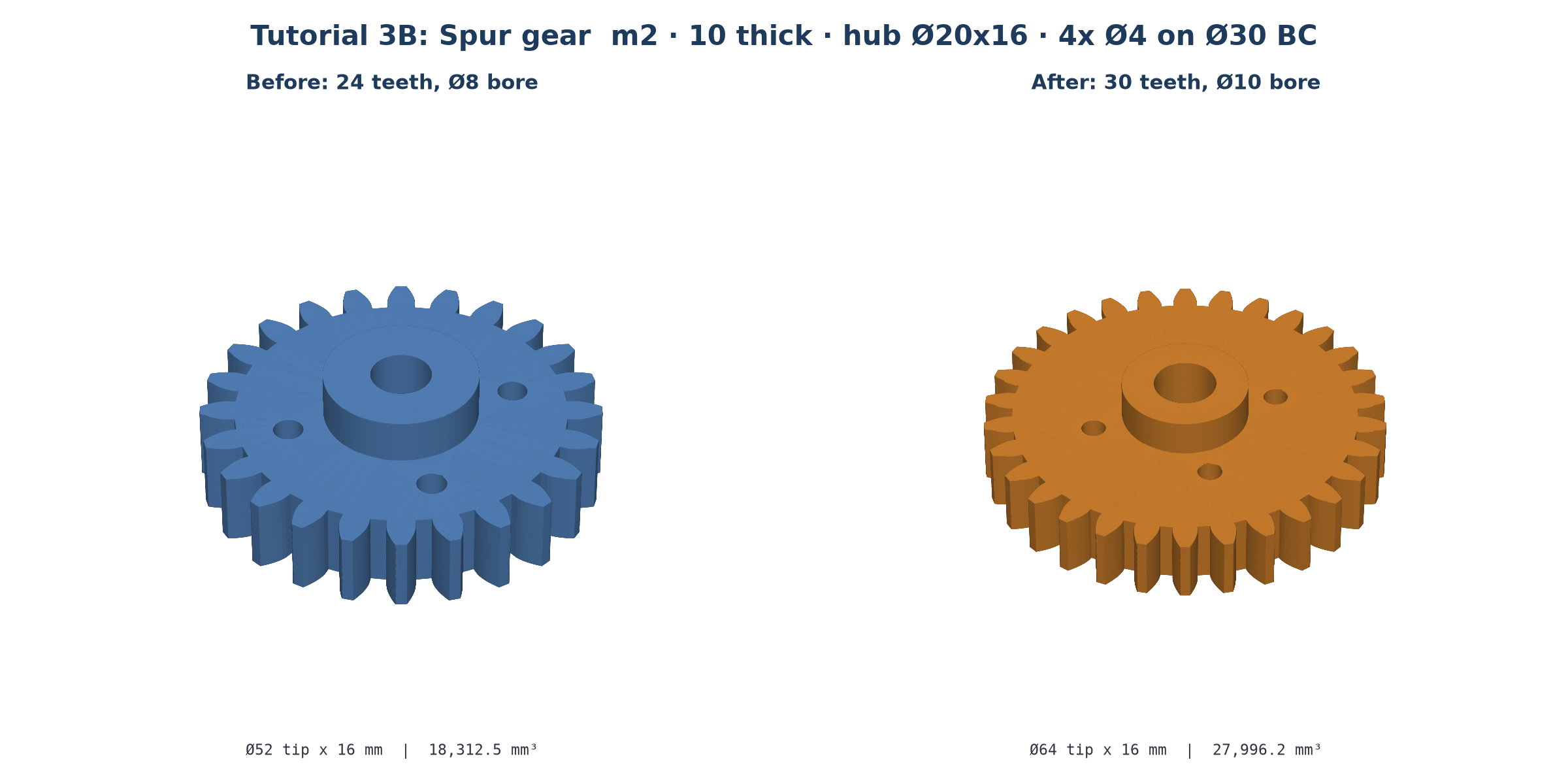
24-tooth spur gear, module 2 mm, 10 mm thick, with a 20 mm diameter x 16 mm tall center hub, an 8 mm through bore, and four 4 mm lightening holes on a 30 mm bolt circle
Expect PASS at 51.98 × 51.98 × 16 mm with a volume of 18,312.5 mm³.
// prompt: 24-tooth spur gear, module 2 mm, 10 mm thick, with a 20 mm diameter x 16 mm tall center hub, an 8 mm through bore, and four 4 mm lightening holes on a 30 mm bolt circle
// verified with design/dsl.py 2026-10-27, volume 18312.5 mm^3
{
  "plan": "1. 24-tooth module-2 spur gear, 10 thick, z 0..10 (pitch dia 48, tip dia 52). 2. Hub cylinder dia 20 x 16 on the same axis, z 0..16. 3. Union. 4. 8 mm through bore on the axis. 5. Four 4 mm lightening holes on a 30 mm bolt circle.",
  "units": "mm",
  "issues": [
    {"type": "assumption", "msg": "Pressure angle 20 deg (default); hub sits on the gear base and projects 6 mm above the gear face.", "ref": "$hub_h"}
  ],
  "params": {
    "m": 2,
    "z": 24,
    "gear_t": 10,
    "hub_d": 20,
    "hub_h": 16,
    "bore_d": 8,
    "lh_d": 4,
    "bc_d": 30
  },
  "steps": [
    {"id": "gear", "op": "spur_gear", "module": "$m", "teeth": "$z", "thickness": "$gear_t"},
    {"id": "hub", "op": "cylinder", "diameter": "$hub_d", "height": "$hub_h"},
    {"id": "body", "op": "union", "items": ["gear", "hub"]},
    {"id": "bore", "op": "hole", "target": "body", "face": "top", "positions": [[0, 0]], "diameter": "$bore_d"},
    {
      "id": "lightening",
      "op": "hole",
      "target": "bore",
      "face": "top",
      "positions": {"polar": {"count": 4, "radius": "=$bc_d/2", "start_deg": 45}},
      "diameter": "$lh_d"
    }
  ],
  "result": "lightening"
}
How it works
- spur_gear builds an involute gear centred on the Z axis from z = 0, with a 20° pressure angle by default. Pitch Ø = m × z = 48. Tip Ø = m × (z + 2) = 52. Root Ø = m × (z − 2.5) = 43.
- Hub. The cylinder also starts at z = 0 (anchor base). It overlaps the gear for its first 10 mm and stands 6 mm proud. The union fuses them into one solid.
- Bore. A hole on face: "top" at [0, 0] with no depth goes through all 16 mm.
- Bolt circle. Instead of listing 4 coordinates, positions uses {"polar": {"count": 4, "radius": "=$bc_d/2", "start_deg": 45}}. The holes sit at 45°, 135°, 225° and 315° on a 30 mm circle. They span r = 13…17 mm, clear of the hub (r 10) and the root circle (r 21.5).
- spur_gear also has a built-in bore field. A separate hole step makes the bore a visible, editable step and lets you add a counterbore later (cbore_diameter / cbore_depth).
"z": 24 → 30, "bore_d": 8 → 10
| Version | Tip Ø × height | Volume |
|---|---|---|
| 24 teeth, Ø8 bore | 52 × 16 | 18,312.5 mm³ |
| 30 teeth, Ø10 bore | 64 × 16 | 27,996.2 mm³ |
The rebuild takes seconds. Mating gears need the same m. Their centre distance is m × (z1 + z2) / 2, so a 24T and a 30T gear at module 2 sit 54 mm apart. Keep bc_d / 2 + lh_d / 2 below the root radius when you shrink the tooth count.
Making it: 3D print it in PETG or nylon for prototypes. Or take spur_gear.step to CAM, check feeds & speeds in FeedWhiz and simulate the toolpath in G-code Sim.
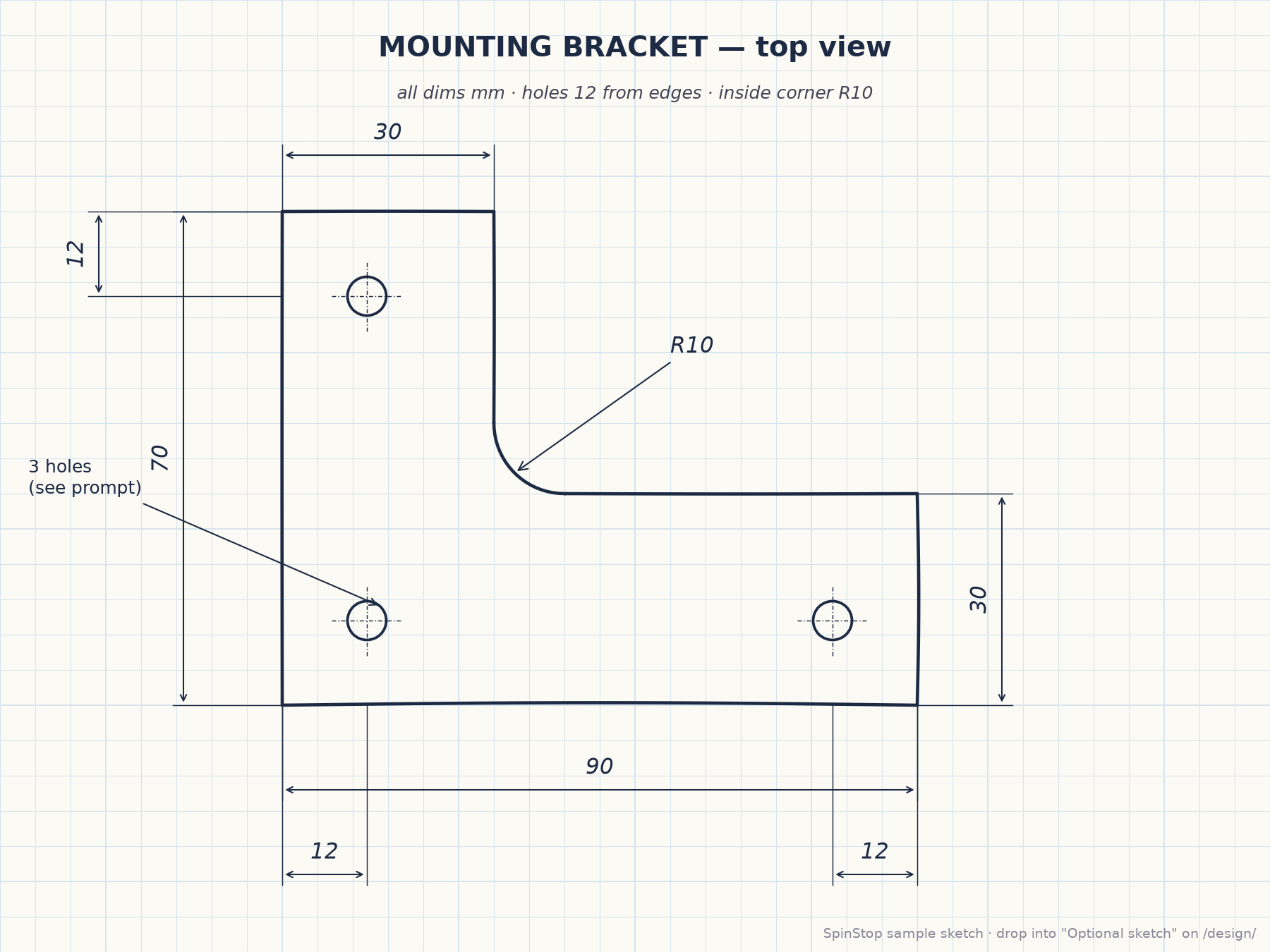
Download sample_sketch_plate.png. It's a top view of an L-shaped mounting bracket: 90 × 70 outline, 30-wide legs, an R10 inside corner and 3 holes 12 mm from the edges. You can also photograph your own pencil sketch. Dark lines on light paper, every number legible, one view per image.
On /design/, drag the image onto the Optional sketch drop zone, click it to choose a file, or paste with Ctrl+V. It accepts PNG, JPEG, WEBP or GIF up to 10 MB. Then type a short prompt that adds only what the drawing lacks:
Make this bracket 6 mm thick with M5 clearance holes
Click Generate. The status first shows describing sketch.
issues as an assumption. Here that's the M5 clearance = 5.5 mm. Check those first.A correct result looks like this recipe (verified at 90 × 70 × 6 mm, 23,101.1 mm³):
{"units":"mm","plan":"1. L-shaped plate outline from the sketch (90x70, 60x40 notch at top-right), extruded 6 mm. 2. R10 inside corner. 3. Three 5.5 mm M5-clearance holes 12 mm from the edges.",
"issues":[{"type":"assumption","msg":"M5 clearance = 5.5 mm (normal fit).","ref":"$hole_d"}],
"params":{"t":6,"hole_d":5.5,"r_in":10},
"steps":[{"id":"plate","op":"extrude","sketch":{"points":[[0,0],[90,0],[90,30],[30,30],[30,70],[0,70]]},"height":"$t","anchor":"corner"},
{"id":"corner","op":"fillet","target":"plate","edges":"near","radius":"$r_in","points":[[30,30,3]]},
{"id":"holes","op":"hole","target":"corner","face":"top","diameter":"$hole_d","positions":[[12,12],[78,12],[12,58]]}],
"result":"holes"}
Your generated CADL may use different ids or a slightly different construction. That's fine as long as the bounding box, holes and volume match.
| Part | CADL | STL | STEP |
|---|---|---|---|
| Project box | project_box.cadl | project_box.stl | project_box.step |
| Spur gear | spur_gear.cadl | spur_gear.stl | spur_gear.step |
| Sample sketch | sample_sketch_plate.png |
Drop a .cadl file on the Designer's drop zone to open it straight in the CADL editor.
| Time | On screen | Voice-over |
|---|---|---|
| 0:00–0:06 | Title card: box, gear and sketch thumbnails | "Tutorial three: hollow enclosures, gears, and parts from a drawing." |
| 0:06–0:18 | Paste the box prompt, Mode = 3D print, Generate, PASS 80×50×30 | "Describe the box: outer size, wall, open top, corner radius, and floor holes." |
| 0:18–0:30 | CADL editor: highlight box → fillet → shell → hole | "Block, round the corners, shell it open on top, drill the floor. Fillet before shell gives matching inside corners." |
| 0:30–0:38 | h 30 → 40, wall 2.5 → 3.5, Ctrl+Enter, box_preview.png after |
"Taller and thicker? Change two numbers and rebuild. No AI needed." |
| 0:38–0:50 | Paste the gear prompt, Generate, rotate the gear | "Now a 24-tooth, module-2 spur gear with a hub, a bore, and four lightening holes." |
| 0:50–1:00 | Highlight spur_gear, union, polar positions; overlay pitch/tip/root circles |
"Pitch diameter is module times teeth. The bolt circle is one polar line, not four coordinates." |
| 1:00–1:08 | z 24 → 30, bore_d 8 → 10, Rebuild |
"Thirty teeth and a ten-millimetre bore, in seconds." |
| 1:08–1:20 | Drag sample_sketch_plate.png onto the drop zone, type the short prompt, status "describing sketch" | "Have a drawing? Drop it in. The vision model reads every dimension. You add thickness and hole size." |
| 1:20–1:30 | Result 90×70×6 with issue "M5 clearance = 5.5 mm"; links to the downloads | "Check the assumptions, fix any number by hand, and export STL or STEP. Downloads are below." |
← Home · ← Tutorial 2 · Tutorial 1 · Full Reference & FAQ · Source: tutorial-3-enclosure-gear-sketch.md